Overview
This is Version 1 of The Grid's API. It's designed to be a straightforward method for your software to interact with our Company and Personnel data. You use specific web links (URLs) to either:
- Ask for data (like searching or filtering companies/people).
- Send a specific request about a company or person. We use standard web technology, and the data you get back is organized in a simple format (JSON). The system will also let you know if your request worked or if there was an error.
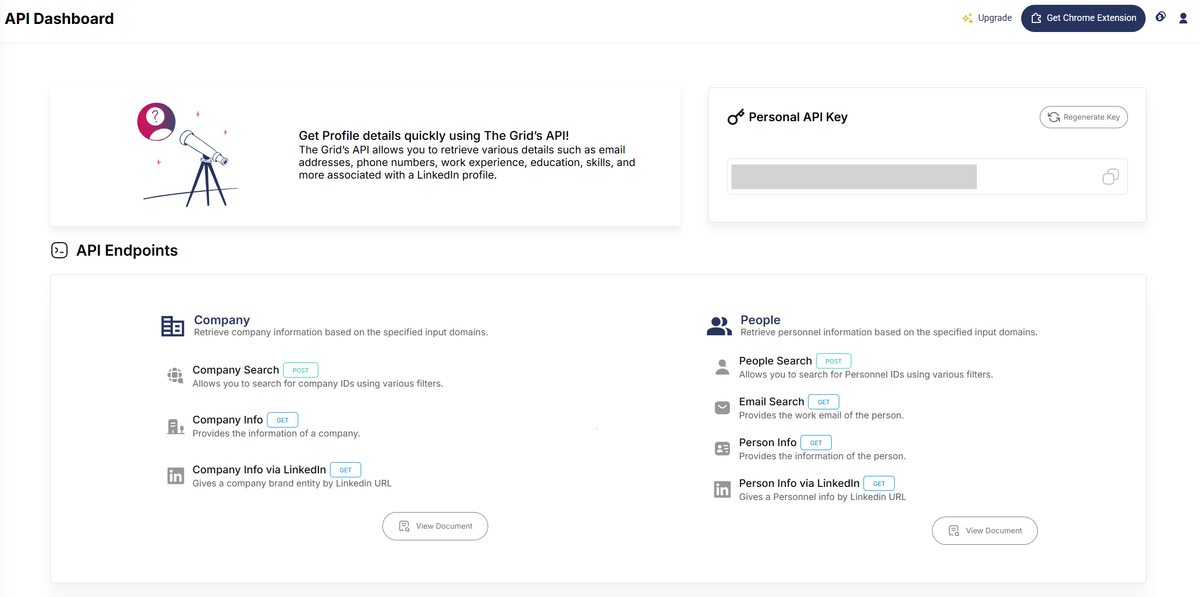
Using The Grid's API Key
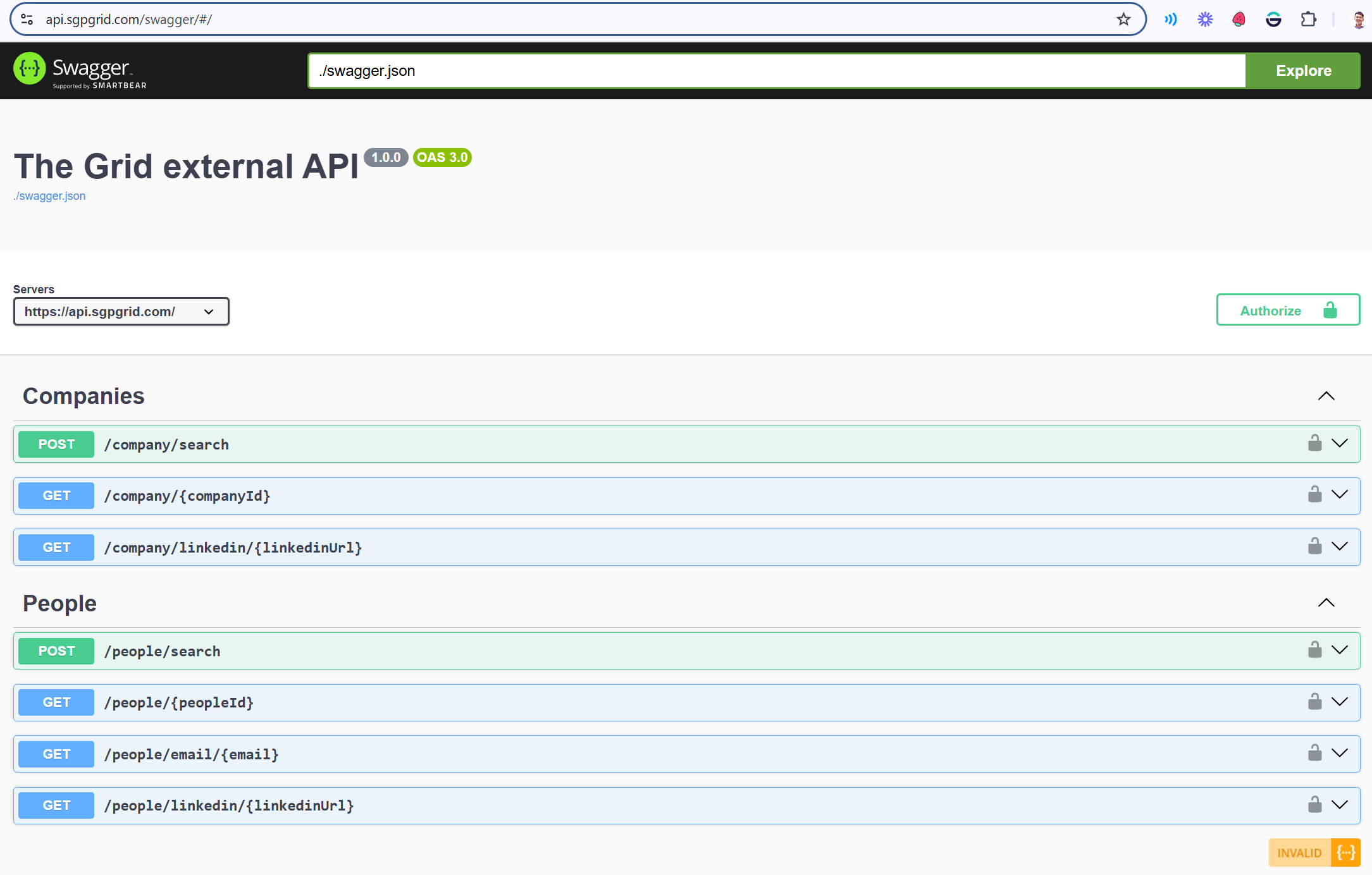
There are 7 methods below to search and retrieve results for company or people records.
Methods
1. Search companies by using filters (i.e. Company Search)
By using the company search filter, you'd be able to use various filter properties to retrieve a list of company IDs.
This guide helps you understand the JSON structure used to define search criteria when querying our API for company and personnel data. By specifying various parameters within this structure, you can refine your search to retrieve highly specific information.
Understanding Our API: Search Criteria Structure
This guide helps you understand the JSON structure used to define search criteria when querying our API for company and personnel data. By specifying various parameters within this structure, you can refine your search to retrieve highly specific information.
Important Note on Country Filters: All country selection filters in this API structure use ISO 3166-1 numeric country codes. Please refer to the "Supported Countries and Codes" section below for a definitive list of supported countries and their corresponding codes. Only these countries are supported for filtering.
Supported Countries and Codes
For any filter that requires a country code (e.g., headcount.country, headquarterList, plannedExpansion.country, countryList, countryBasedIn), only the following countries and their respective ISO 3166-1 numeric codes are supported:
- Australia: 036
- Indonesia: 360
- Malaysia: 458
- New Zealand: 554
- Philippines: 608
- Singapore: 702
- Thailand: 764
- Vietnam: 704
Please ensure you use these numeric codes when specifying countries in your API requests. See full list here.
1. Company-Specific Filters
These fields allow you to filter companies based on their attributes:
headcount (Object)
- Purpose: Filters companies based on their number of employees.
- Fields:
country(String): An ISO 3166-1 numeric country code (e.g., "036" for Australia). This specifies the country for which the headcount numbers apply.gt(Number): "Greater than." Use this to find companies with more than the specified number of employees.lt(Number): "Less than." Use this to find companies with fewer than the specified number of employees.
- Example:
{"country": "036", "gt": 10, "lt": 100}would find companies in Australia with between 11 and 99 employees.
headquarterList (Array of Strings)
- Purpose: Filters companies based on the location of their headquarters.
- Values: Provide one or more supported ISO 3166-1 numeric country codes (e.g.,
["702", "458"]for Singapore or Malaysia). The API will search for companies headquartered in any of the listed supported countries.
revenue (Object)
- Purpose: Filters companies based on their reported revenue.
- Fields:
gt(String): "Greater than." Revenue figures (e.g., "1m" for 1 million).lt(String): "Less than." Revenue figures (e.g., "5m" for 5 million).
- Example:
{"gt": "1m", "lt": "5m"}would find companies with revenue between 1 million and 5 million (exclusive of the exact numbers, typically).
district (Array of Strings)
- Purpose: Filters companies based on specific districts or regional identifiers within supported countries (e.g.,
["12", "25"]). The availability and meaning of district codes may vary by country; please refer to specific API documentation if available.
companyAge (Object)
- Purpose: Filters companies based on their age.
- Fields:
unit(String): The unit of time for the age (e.g., "months", "years").gt(Number): "Greater than." The company is older than this value.lt(Number): "Less than." The company is younger than this value.
- Example:
{"unit": "months", "gt": 5, "lt": 10}would find companies between 6 and 9 months old.
profitMaking (Boolean)
- Purpose: Set to
trueto include companies identified as profit-making.
lossMaking (Boolean)
- Purpose: Set to
trueto include companies identified as loss-making. - Note: If both
profitMakingandlossMakingaretrue, it may include companies that are either, or those for whom a clear distinction isn't available and both tags apply.
recentFunding (Object)
- Purpose: Filters companies based on the amount of recent funding received.
- Fields:
gt(Number): "Greater than." The funding amount is greater than this value.lt(Number): "Less than." The funding amount is less than this value.- Note: The currency or unit (e.g., thousands, millions) should be consistent with API documentation.
- Example:
{"gt": 500, "lt": 10000}filters for funding amounts between 501 and 9999.
companyType (Array of Strings)
- Purpose: Filters companies by their type (e.g.,
["SME"]for Small and Medium-sized Enterprises).
entityType (Array of Strings)
- Purpose: Filters companies by their legal entity type (e.g.,
["Private Limited Company", "Unlimited Public Company"]).
cspCategory (String)
- Purpose: Filters companies based on a customer spending potential category (e.g., "high", "medium", "low").
fundingStatus (Array of Strings)
- Purpose: Filters companies by their funding status (e.g.,
["private"], "public", "seed").
address (Array of Strings)
- Purpose: Filters companies by parts of their address (e.g., street names like
["Best st.", "Coolest avenue"]).
sicIndustry (Array of Strings)
- Purpose: Filters companies using Singapore Standard Industrial Classification (SSIC) codes (e.g.,
["13929", "14103"]). Refer to SSIC report by Department of Statistics Singapore for a list of codes: https://www.singstat.gov.sg/-/media/files/standards_and_classifications/industrial_classification/ssic2015report-v2018a.pdf.
inhouseIndustry (Array of Strings)
- Purpose: Filters companies using internal or proprietary industry classification codes (e.g.,
["TGIC012", "TGIC011.0008"]). Please consult our API documentation for available codes. See full list at here
plannedExpansion (Object)
- Purpose: Filters companies based on their planned expansions into supported countries.
- Fields:
country(String): The ISO 3166-1 numeric country code of a supported country where expansion is planned.value(Number): A value representing the scale or target of the expansion (e.g., number of new locations, percentage growth).
headcountChange (Object)
- Purpose: Filters companies based on recent changes in their headcount within a supported country.
- Fields:
country(String): The ISO 3166-1 numeric country code of a supported country where the headcount change occurred.action(String): The type of change (e.g., "inc" for increase, "dec" for decrease).size(Number): The magnitude of the change (e.g., number of employees or percentage).timeframe(Number): The period over which the change occurred (e.g., in months or quarters).
countryList (Array of Strings)
- Purpose: Filters companies that have a presence or operate in any of the specified supported ISO 3166-1 numeric country codes.
countryBasedIn (Array of Strings)
- Purpose: Filters companies based in any of the specified supported ISO 3166-1 numeric country codes. This typically refers to the primary country of operation or incorporation.
2. Personnel-Specific Filters
These fields allow you to filter for specific individuals within companies:
jobTitle (Array of Strings)
- Purpose: Filters for individuals holding specific job titles (e.g.,
["cookie analyst", "baking engineer"]).
personnelName (Array of Strings)
- Purpose: Filters for individuals by their names (e.g.,
["John Doe", "Jane Doe", "Michael"]).
jobFunction (Array of Strings)
- Purpose: Filters for individuals based on their job function or department (e.g.,
["administrative", "consulting"]). - See full list here.
jobSeniority (Array of Strings)
-
Purpose: Filters for individuals based on their seniority level (e.g.,
['Founder & Owner', 'C Suite', 'Director', 'VP', 'General Manager / Country Manager', 'Head', 'Lead', 'Manager', 'Senior', 'Others',]). -
See full list here.
3. Data & Contact Filters
These fields help manage the quality and type of contact information retrieved:
emailValidity (Array of Strings)
- Purpose: Filters for contacts based on the validation status of their email addresses (e.g.,
["validated"], "unverified").
excludeWithoutEmail (Boolean)
- Purpose: Set to
trueto exclude records (companies or individuals) that do not have an associated email address. Defaults tofalseif not specified.
excludeWithoutPhone (Boolean)
- Purpose: Set to
trueto exclude records that do not have an associated phone number. Defaults tofalseif not specified.
General Notes
- Arrays (Lists): For fields that accept an array of strings (e.g.,
jobTitle,countryList), providing multiple values typically acts as an "OR" condition. The API will search for records that match any of the specified values. gtandlt: These stand for "greater than" and "less than," respectively. They are used to define numerical or date ranges. Typically, these ranges are exclusive of the numbers themselves (e.g.,gt: 10means 11 or more).- Codes (Industry, etc.): For fields requiring codes other than country codes (like SIC codes), please refer to the relevant sections of our API documentation or industry-standard code lists for valid values applicable to the supported regions.
| In-House Taxonomy Code | Industry |
|---|---|
| TGIC001 | Accounting & Tax |
| TGIC003 | Banking Financial Services & Insurance (BFSI) |
| TGIC003.0001 | Banking |
| TGIC003.0002 | Fund Management |
| TGIC003.0003 | Insurance |
| TGIC003.0004 | Others in Banking Financial Services & Insurance (BSFI) |
| TGIC004 | Travel |
| TGIC005 | Event Management / MICE |
| TGIC006 | Legal Services |
| TGIC008 | Market Research |
| TGIC009 | Marketing & Advertising |
| TGIC010 | Recruitment |
| TGIC011 | Information & Communications Technology (ICT) |
| TGIC011.0001 | UI/UX |
| TGIC011.0002 | Software & App Development |
| TGIC011.0003 | System Integration |
| TGIC011.0004 | Enterprise Resource Planning |
| TGIC011.0005 | Business Process Management |
| TGIC011.0006 | IT Consulting |
| TGIC011.0007 | SaaS |
| TGIC011.0008 | Video Production |
| TGIC011.0009 | Internet of Things |
| TGIC011.0010 | Cybersecurity |
| TGIC011.0011 | Blockchain |
| TGIC011.0012 | AR/VR |
| TGIC011.0013 | BI & Big Data Analytics |
| TGIC011.0014 | Cloud Services |
| TGIC011.0015 | Data Center |
| TGIC011.0016 | Digital Marketing |
| TGIC011.0017 | Web Design / eCommerce Development |
| TGIC011.0018 | Others in Information & Communications Technology (ICT) |
| TGIC011.0019 | Telecommunications |
| TGIC011.0020 | Media |
| TGIC012 | Agriculture & Fishing |
| TGIC013 | Apparel & Fashion |
| TGIC014 | Automotive |
| TGIC015 | Chemicals |
| TGIC016 | Interior Design |
| TGIC017 | Construction |
| TGIC017.0001 | Building Construction |
| TGIC017.0002 | Civil Engineering |
| TGIC017.0003 | Others in Construction |
| TGIC019 | Education |
| TGIC020 | Arts, Entertainment & Recreation |
| TGIC021 | FMCG (Manufacturing) |
| TGIC022 | Food & Beverage Services |
| TGIC025 | Hotel / Accommodation |
| TGIC026 | Manufacturing |
| TGIC027 | Oil & Gas |
| TGIC028 | Passenger Transportation |
| TGIC029 | Pharmaceuticals |
| TGIC030 | Real Estate |
| TGIC031 | Retail |
| TGIC032 | Utilities |
| TGIC032.0001 | Recycling |
| TGIC033 | Wholesale / Distribution |
| TGIC034 | Public Relations & Communications |
| TGIC035 | Creative Design & Branding |
| TGIC036 | Corporate Training |
| TGIC037 | Translation |
| TGIC038 | Management Consulting |
| TGIC039 | Corporate Secretarial Services |
| TGIC040 | Security & Investigation |
| TGIC042 | Engineering |
| TGIC044 | Corporate Finance |
| TGIC045 | Photography |
| TGIC047 | Technical Testing |
| TGIC000 | Others |
| TGIC048 | Healthcare |
| TGIC049 | Social Care |
| TGIC050 | Maritime |
| TGIC051 | Food & Beverage Manufacturing |
| TGIC052 | Metals |
| TGIC053 | Electronics |
| TGIC053.0001 | Consumer Electronics |
| TGIC053.0002 | Semiconductor |
| TGIC054 | Logistics & Warehousing |
| TGIC055 | Aviation |
| TGIC056 | Printing |
| TGIC057 | Architecture |
| TGIC058 | Furniture & Household Appliances |
| TGIC058.0001 | Furniture |
| TGIC058.0002 | Household Appliances |
| TGIC059 | Government Administration |
| TGIC060 | Consumer Services |
| TGIC061 | Mining |