At the top of the table in both the Company and Personnel tabs, you will find a feature called Show Contacts.
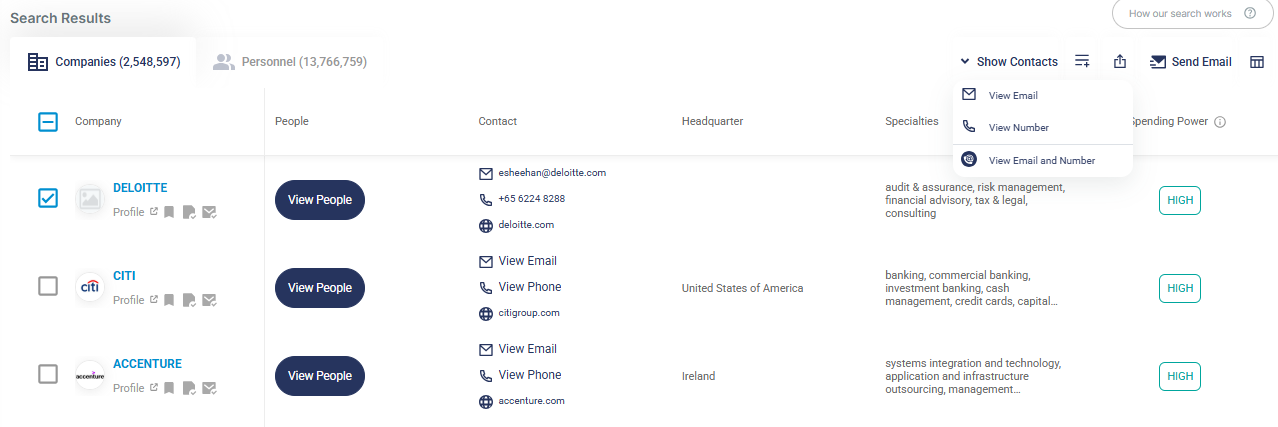
The Show Function offers three options:
- View Email – shows email addresses
- View Number – shows phone numbers
- View Phone and Email – shows both phone numbers and email addresses
This feature allows you to unmask and view contact details in bulk for the selected records within the Company and Personnel tabs, respectively.
Credit Deduction Example
Using this function will automatically deduct the relevant view credits based on your selection.
Example:
If you select 5 personnel records where neither the email addresses nor phone numbers have been viewed, and you only need their email addresses, simply click View Email.
This will deduct 5 personnel email view credits.
If you instead select View Email and Number, the system will deduct:
- 5 personnel email view credits, and
- 5 personnel number view credits.
Note:
If there are no phone numbers available for the selected personnel, the personnel number view credits will be automatically refunded to your account.
If you choose to export the same contacts where the email address, phone number, or both have already been viewed, only export credits will be deducted. View credits will not be deducted.